


I built TraceGRC at https://tracegrc.13thoctet.com/. The app needed a database, so I spun up CloudSQL in GCP. Simple choice. Professional solution. Standard practice.
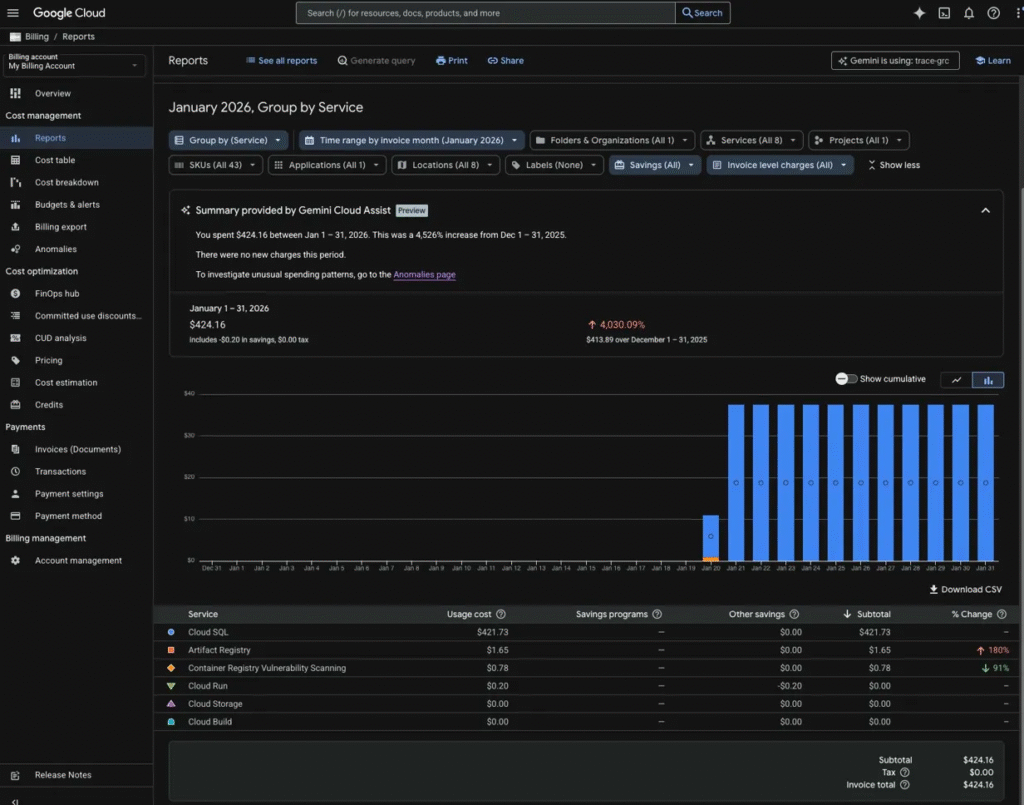
Then January’s bill arrived: $424.16.
For a personal project meant to showcase technical skills on LinkedIn, this stung. The CloudSQL instance ran continuously, charging by the hour, whether I used it or not. No traffic alerts. No cost warnings. No “hey, you’re burning money” notifications.
The math is simple. CloudSQL charges for provisioned resources, not usage. A db-f1-micro instance costs around $14/month. But add high availability, automated backups, and a few configuration choices, and you’re looking at $420+ monthly.
What Went Wrong
I needed a database. CloudSQL seemed like the obvious choice for a GCP-hosted app. But I missed three things:
• Personal projects don’t need enterprise-grade availability • Showcase apps don’t require managed database services • Cost monitoring requires active setup, not assumptions
The problem wasn’t the technology. The problem was matching the solution to the need.
The Fix
I deleted the CloudSQL instance immediately. The new plan: local PostgreSQL running on the same compute instance as the app.
Benefits: • Zero database charges beyond compute costs • Full control over configuration • Same functionality for the use case • Database lives and dies with the app instance
Trade-offs: • Manual backup management • No automatic failover • Backups require scripting
For a demonstration app, these trade-offs make sense. Enterprise features cost enterprise money.
Lessons Applied
First, define the problem before choosing tools. TraceGRC needs to work and demonstrate competence. It doesn’t need five-nines uptime.
Second, monitor spending from day one. GCP has billing alerts. Set them up before deployment, not after the invoice.
Third, right-size solutions to requirements. Managed services solve real problems. But not every problem needs a managed service.
Moving Forward
The rebuilt TraceGRC runs on local PostgreSQL. Same features. Same functionality. Dramatically lower cost.
This wasn’t a failure. This was education through direct experience. Now I know exactly what CloudSQL costs and when to use it.
For client work with compliance requirements and uptime guarantees, CloudSQL makes sense. For personal projects showcasing technical skills, local databases work fine.
The best solutions solve the right problem at the right cost. Everything else is waste.